Common / Regenerating a summary
Is this meeting summary good enough?
Regenerate it with another AI,
and compare to check.
Just pick another model below the summary answer. The original answer stays, and a summary rewritten from a different angle is added below it.
Try it in Prompt Flow StudioMinutes provided
Summarize the following fictional meeting minutes in 3 points, assuming they will be read by a sales manager who did not attend the meeting.
[Wakaba Electric, Weekly Promotion Meeting, Thursday, November 19, 2026]
- Agreed that the year-end campaign will start on Tuesday, December 1 and end on Sunday, December 27.
- Two products are covered: the K-20 electric kettle and the R-5 rice cooker. Whether to include the V-3 vacuum cleaner will be decided after checking inventory. Tamura of the Logistics Section will check by Friday, November 27.
- Agreed on a 5% discount. A 10% option was also raised but was dropped because it would lower the profit margin.
- 40,000 flyers will be printed. The distribution area is undecided and will be decided next time.
- Mori of the Promotion Section will draft the in-store POP copy by Wednesday, November 25.
- The next meeting is on Monday, November 30, from 15:00.
Regenerated summary
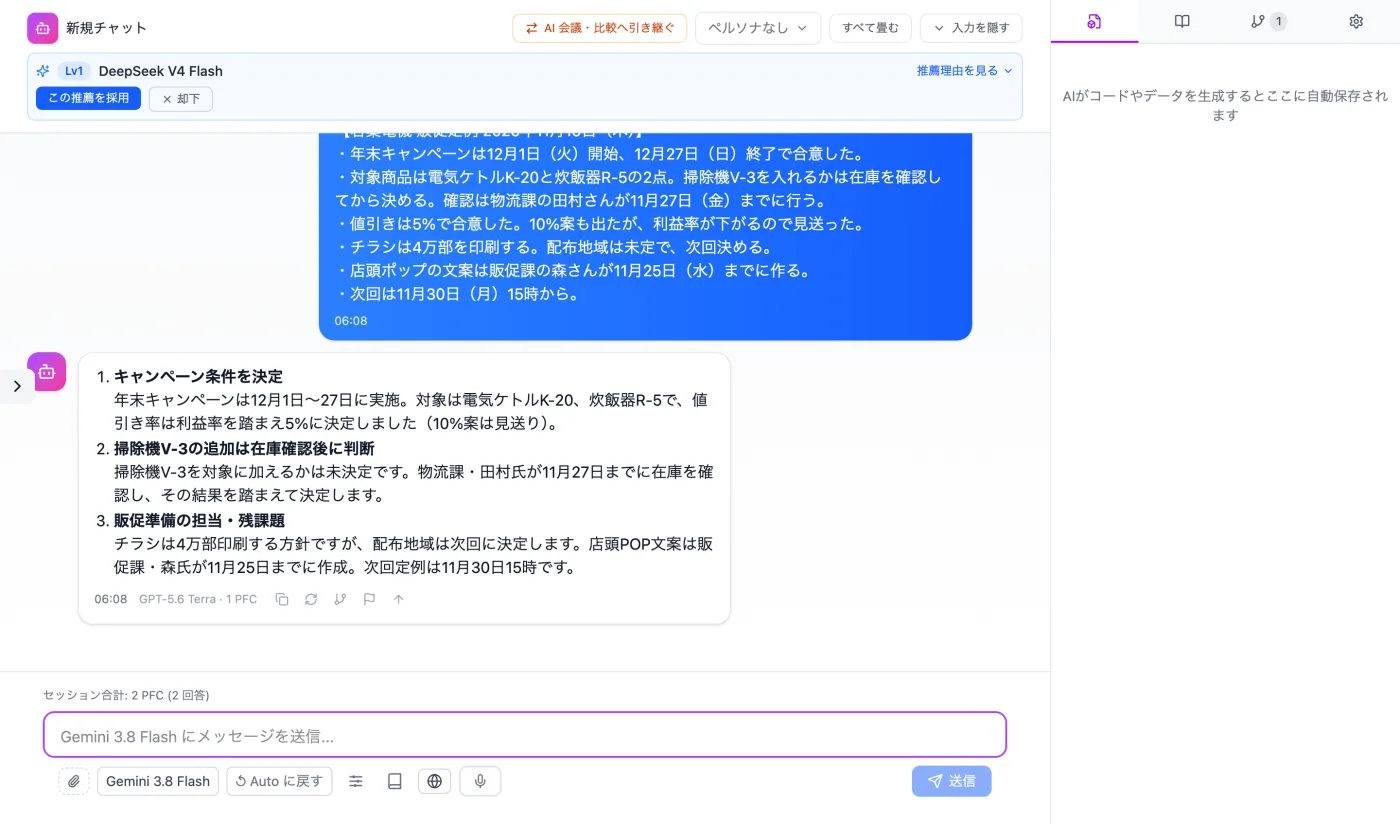
Actual screen (regenerated with GPT-5.6 Terra) (an example of use)View larger image
Just 3 steps
Send the first request
Make the request in a normal chat and get the first answer.
Pick another model
Choose a model below the answer, and regeneration starts.
Check against the source
Check that the owners and deadlines match the original minutes.
How to rewrite meeting-minute summaries with another model
- In a normal chat, send the minutes along with a request such as "Summarize this in 3 points for someone who did not attend the meeting."
- When the first summary comes back, read it and note anything missing or too long.
- Below the answer, choose another model and regenerate.
- The original answer stays, and the other model's summary is added below it. Read the two side by side.
- Adopt the summary that suits the reader better.
What to look at when comparing
- Are all the decisions included, with nothing missing?
- Do the owners' names and the deadline dates match the original minutes?
- Is the order easy to follow for the reader (a sales manager in this example) even without having attended?
- Are pending items such as "undecided" or "to be decided next time" written separately from the decisions?
- Are the sentence length and the granularity of the bullet points easy to read?
- Do the two summaries describe the same fact in different ways?
- Can you tell which meeting the summary is about from the first sentence?
- Does the summary fit the 3-point format you asked for?
- Are the conclusions and the reasons behind them written separately?
- Do expressions like "next time" or "next week" match the dates in the original minutes?
How to finalize from the two summaries
- Read the other model's summary as one proposed rewrite of the original answer.
- Pick the well-written sentences from each summary and use them in the final summary. You can also adopt one of them as is.
- Saving the adopted summary together with the original minutes lets you trace what happened later.
- Noting which model you regenerated with next to the summary helps you remember why you compared them.
- When the two summaries use different headings, choose the one closer to the order the reader wants to pick up information.
- Before sharing it internally, reread the summary and check for any wording the reader might stumble over.
Questions before and after changing models
- Will the regenerated summary have the same headings as the first one?
- A summary with different headings or different retained details may be added below. When comparing, focus on the differences in what was retained.
- Which model should I choose?
- If unsure, pick one first and check that the decisions, owners and deadlines are all there. If anything is missing, regenerate again with another model and line them up.
Other uses work the same way
If you are unsure about the wording, you can also have another AI write it and compare.
Unsure about the summary? Try another angle.
Try it in Prompt Flow Studio