IT & development / Comparing knowledge management tools
A tool that makes
company know-how searchable,
chosen with a comparison table.
Just give notes on each candidate's features and ask for a comparison table. You get a table comparing search, editing, permissions and integrations, plus a recommendation.
Try it in Prompt Flow StudioComparison notes provided
[Comparison notes on knowledge management tools]
- Background: 150 employees. Know-how is scattered across shared folders and chat, and can't be found
- Current environment: email and calendar are on Company U's groupware; work chat is from a different company
- Company X's tool: 600 yen per user per month. Fast search, and can search inside PDFs. Editing uses its own syntax and takes getting used to. Permissions are per folder. Integrates with the groupware
- Company Y's tool: 900 yen per user per month. Intuitive editing. Search covers titles and body text only. Permissions can be set down to the page level. Integrates with the work chat
- Company U's add-on: 300 yen per user per month. Standard search and editing. Permissions can use the current organization information as is
- HR and accounting information should be visible only to the responsible departments
Could you put the 3 candidates into a comparison table across 4 points: search, editing, permission management, and integration with the current environment, and also tell me your recommendation and the reasons?
Comparison table that came back
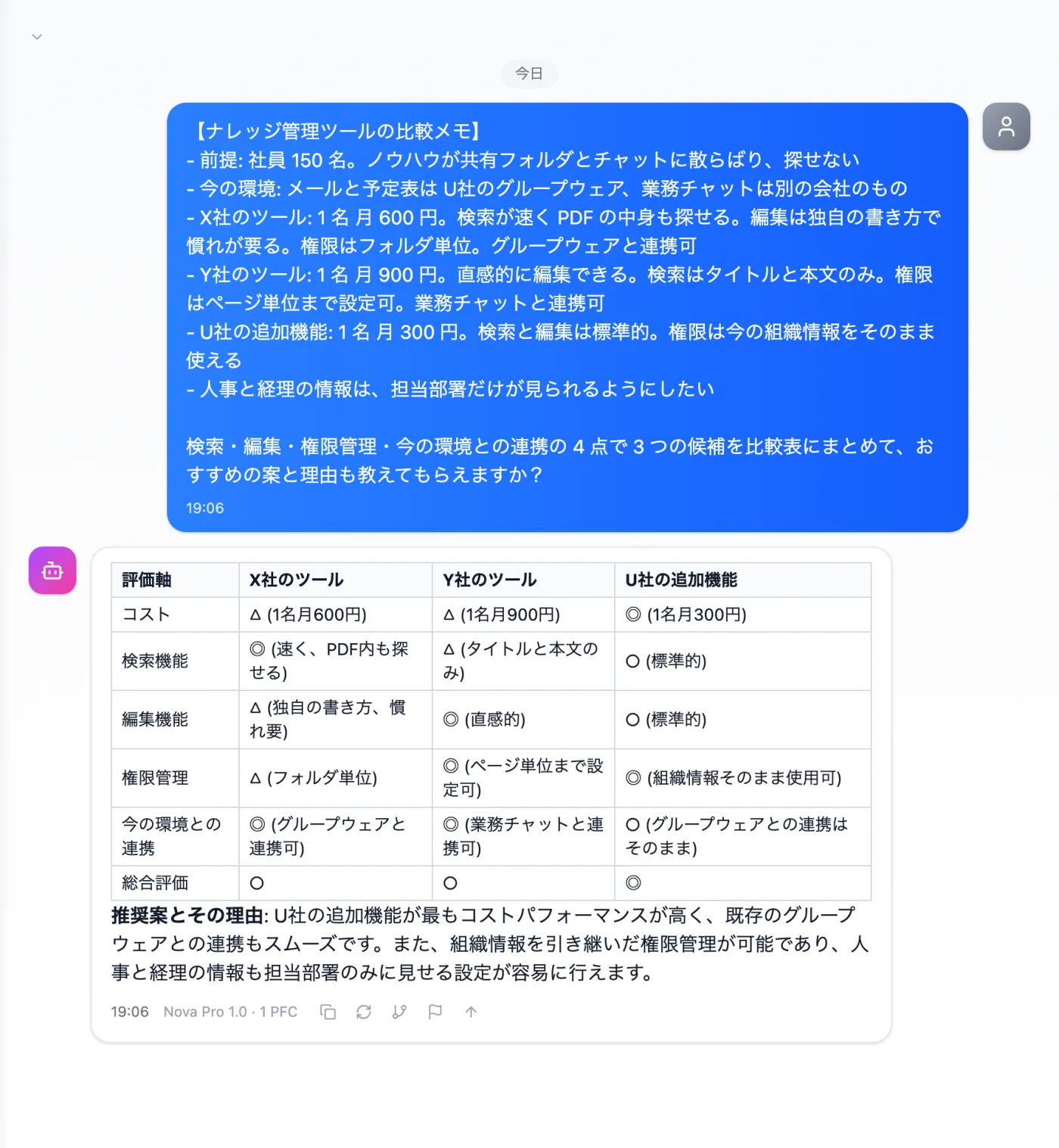
Actual screen (using the "Comparison table" output style) (an example of use)View larger image
Just 3 steps
Write the candidates
Write each candidate's pricing and features, your current environment and your must-have conditions.
Choose a style
Choose "Comparison table" from "Presets" in the input box.
Check against real conditions
Check the reasons for the recommendation against the candidates' actual conditions.
Other uses work the same way
If you are unsure about the wording, you can also have another AI write it and compare.
Choose your next tool with a comparison table.
Try it in Prompt Flow Studio