General / Answer only from internal documents
If it's not in the documents,
I want it to say so.
Answer only from internal documents.
Just set the answer mode to "Knowledge only" and ask. For anything the documents don't cover, it tells you there is no mention.
Try it in Prompt Flow StudioQuestion sent
How much is the late fee if I return a book from the company library late?
Answer returned
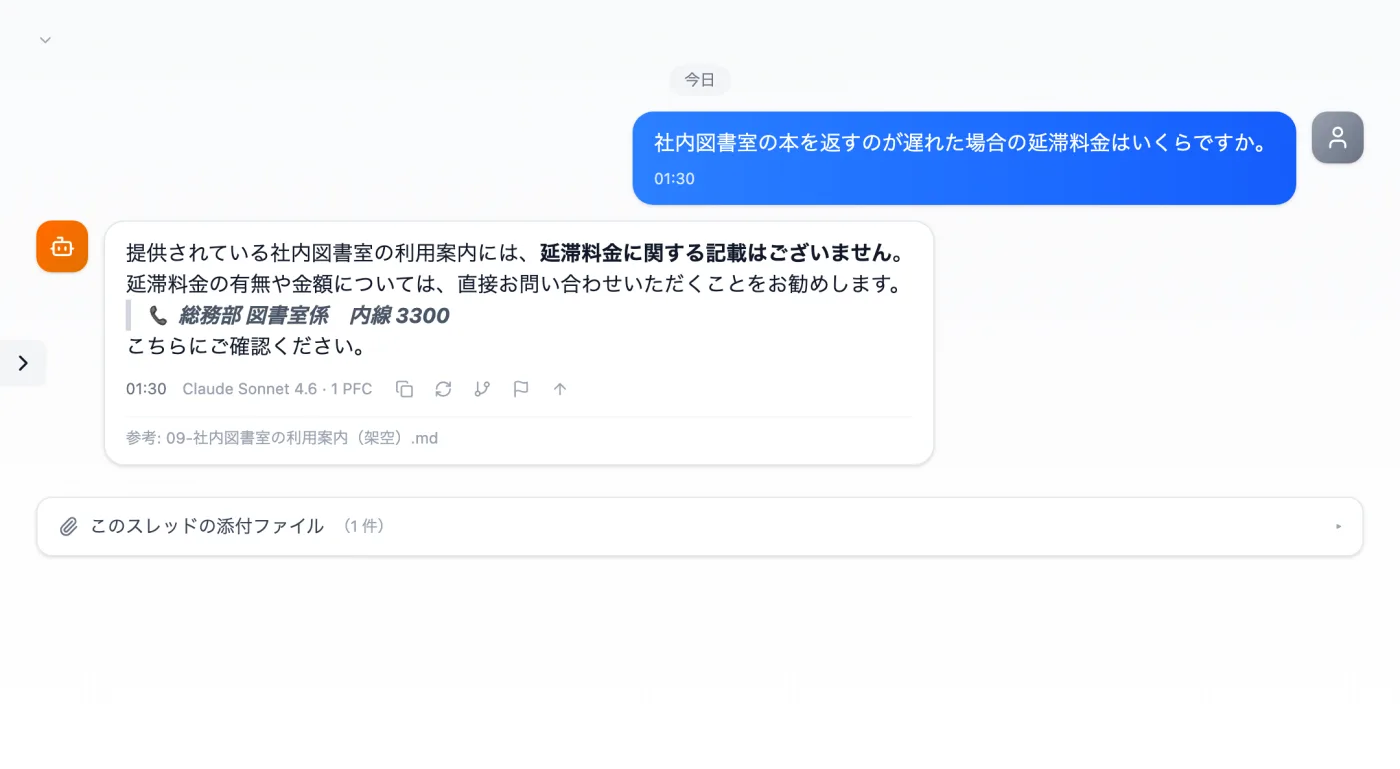
Actual screen (using Knowledge with the answer mode "Knowledge only") (an example of use)View larger image
Just 3 steps
Register documents
Use the book button in the input field to register documents to a set.
Choose Knowledge only
In the thread's right pane, set the answer mode to "Knowledge only."
Ask and cross-check
Check the answer and its "Reference: document name."
How to have questions answered from internal documents
- Prepare the internal documents you want answers based on (rules, manuals, FAQs, etc.).
- Use the book button in the input field to register the documents to a set.
- In the thread's right pane, set the answer mode to "Knowledge only."
- Type a question people often ask at work and send it as is. In this example, the question is "How much is the late fee?"
- Look at the "Reference: document name" attached to the answer and compare it with what the original document says.
Where it helps with internal inquiries
- When you want to look up and confirm company rules, such as work rules, leave, or expense claims, from the documents yourself
- When a new hire wants to look something up before asking a senior colleague
- When you register handover documents so you can look things up even after the previous person in charge has left
- For rules, questions that ask about conditions or amounts, such as "from when" or "up to how much," work well.
- For manuals and procedures, questions that ask about steps, such as "in what order," work well.
- It also works for documents on operating rules, such as lending out supplies or books. This example uses that kind of document.
- When you want to answer questions that keep coming to an internal help desk in a consistent way, based on the documents
How to write questions
- Write questions using wording close to the words used in the documents. For words that are phrased in different ways, such as "leave" and "time off," match the wording the documents use.
- When a question is broad, put the scope of documents you want to ask about at the start, such as "About expense claims."
- Sending questions one at a time makes it easier to compare each answer with what the documents say.
- Putting the conditions you want to know, such as "by when" or "to whom," into the question makes it easier to find the text the answer is based on.
Choosing documents and preparing them before registering
- Register first the rules and FAQs related to the most frequently asked questions.
- Give documents titles that show what they are, such as "Expense claim rules." When you see "Reference: document name" on an answer, you can tell right away which document it is.
- If you split long rules by chapter when registering them, the document name shown as the reference tells you which chapter applies.
- If you write the document's update date in the title or body, you can tell how current the document is when reading the basis for an answer.
- Put handwritten notes and rules passed on verbally into a document before registering them. Then you can trace the basis for answers back to documents.
- At first, register only one or two documents you use often, and try about three questions that actually come up often. If it looks useful, add more documents.
When you ask about something not in the documents
- In this example, it was asked about a late fee that isn't in the documents, and it replied that there was no mention of it.
- When it says there is no mention, check with the department in charge, or add the rule to the document and register it again.
Questions about answers based on documents
- How is "Knowledge only" different from a normal answer?
- It's a setting that answers based only on the registered documents. If you send the same question in another answer mode, you can see how the answers differ.
- What should I do when the rules are revised?
- Register the new version of the document, try the same question, and compare the answers.
Other uses work the same way
If you are unsure about the wording, you can also have another AI write it and compare.
When it doesn't know, it says it doesn't know.
Try it in Prompt Flow Studio