Sales / Visit report and thank-you email
From a single set of meeting notes
to a visit report
and a thank-you email.
Just enter your meeting notes and instructions for 3 steps, then run. Drafts come back in order: extraction, visit report, email.
Try it in Prompt Flow StudioSteps and notes entered
[Step 1 | Extract facts and agreements]
From the following sales meeting notes (fictional), extract the facts, the client's requests, items agreed by both sides, open items and next plans as bulleted lists with headings. Do not write anything not in the notes, and mark anything that requires guessing as "unconfirmed".
[Meeting notes (fictional)]
Date/time: Nov 6, 14:00–15:00 / Place: client's meeting room
Client: Minato Logistics Co., Ltd. (fictional), Saeki (General Affairs Dept.) and Noguchi (IT Section)
Us: Tamura (Sales)
- Attendance is currently tallied on paper time cards. The month-end tally takes 2 general affairs staff 2 full days.
- Interested in the cloud attendance system "TimeLeaf" (fictional). Covers about 120 people at the head office and 2 warehouses.
- The warehouses run on shifts, with late-night clock-ins. They want to clock in on shared terminals.
- Integration with the payroll software is a must. Noguchi will confirm the software name later.
- They want to go live next April. They want to submit the budget request within this fiscal year.
- Agreed: we will send a quote and a proposed rollout schedule by Nov 14.
- Agreed: we will demo the clock-in terminal at the warehouse in late November (the client will contact us with the date).
- Concern: many missed clock-ins in the late-night hours. They asked whether there is an alert feature; we said we would check and get back to them.
[Step 2 | Write the visit report]
Using only the extraction results from the previous step, write an internal visit report. Structure: "Overview (3 lines max)", "Client situation and requests", "Agreements", "Our action items (with deadlines)", "Concerns and unconfirmed items", "Next plans". Do not add information that is not in the extraction results.
[Step 3 | Write the follow-up message]
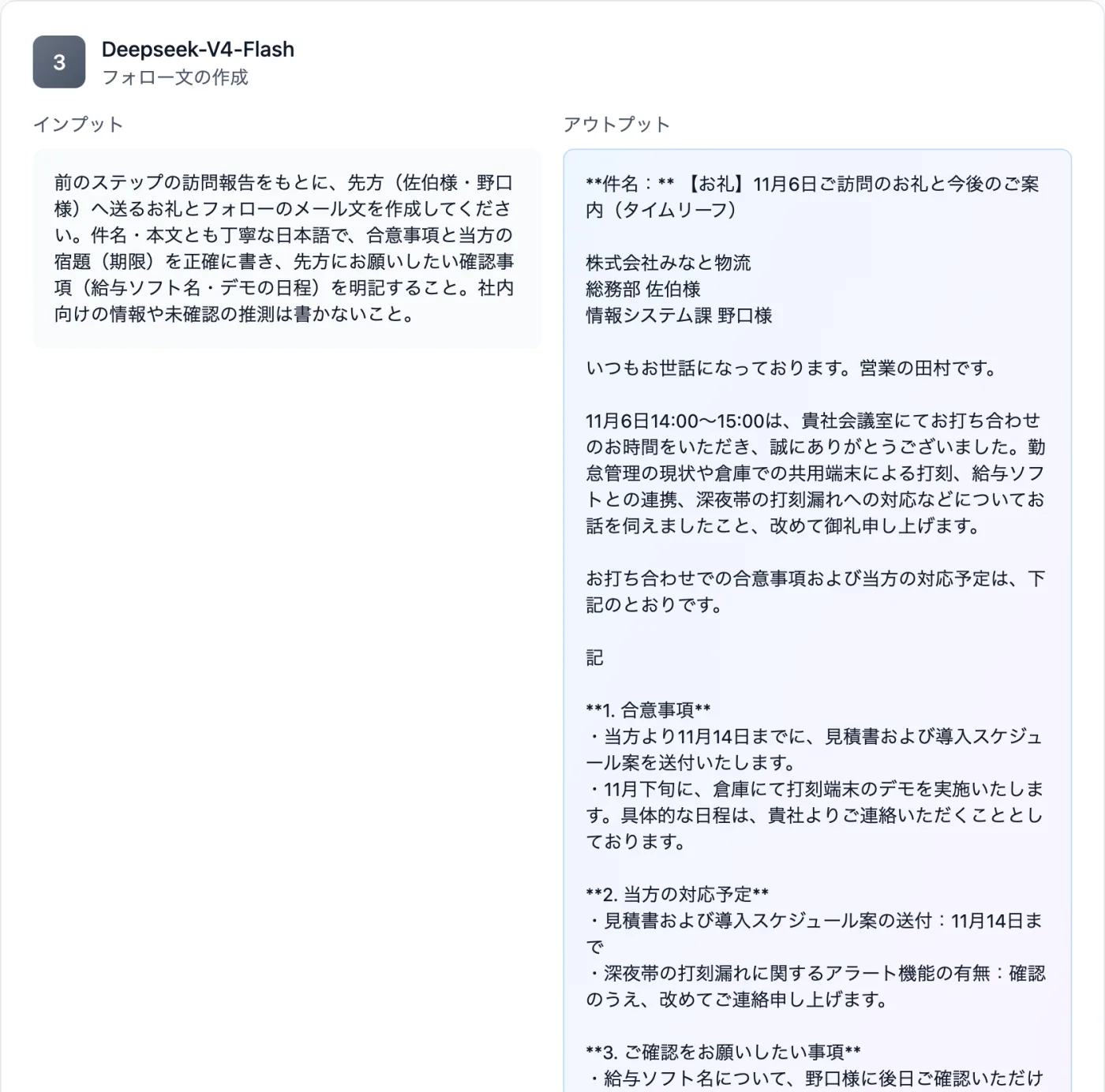
Based on the visit report from the previous step, write a thank-you and follow-up email to the client (Saeki and Noguchi). Write both subject and body in polite Japanese, state the agreements and our action items (deadlines) accurately, and clearly list what we would like the client to confirm (payroll software name, demo date). Do not include internal information or unconfirmed guesses.
[Model]
DeepSeek V4 Flash
Just 3 steps
Split into steps
Open Workflow and give each step a role name and instructions.
Add the material and run
Provide the meeting notes and say what to use from the previous result.
Read the outputs
In each output box, check that deadlines and agreements are kept.
3 steps from meeting notes to report and thank-you email
- Set the mode to "Workflow" and line up 3 steps. Give each step a role name and instructions.
- Step 1 is an instruction to extract facts, requests, agreements, open items and next plans from the meeting notes. Add that nothing outside the notes should be written.
- Step 2 is an instruction to write an internal visit report using only the extraction results from Step 1. Specify the heading structure too.
- Step 3 is an instruction to draft a thank-you and follow-up email to the client based on the visit report from Step 2.
- Enter the meeting notes and run, then read through the deadlines and agreements in each step's output box.
What to write in your meeting notes to make the later steps easier
- Date, place, and the names and departments of the client's attendees
- The client's current situation and problems
- What was agreed on the spot, and action items taken back (with deadlines)
- Points the client was concerned about, and things you promised to check and answer
- Next plans (demo, quote submission date, etc.)
How to think about splitting a request into steps
- If you separate the roles into "organizing facts", "internal report" and "message to the client", you can ask for report wording and client-facing wording separately.
- Put "mark anything that requires guessing as unconfirmed" in the extraction instruction so items that need checking are easy to spot.
When you want to finish post-visit work quickly
- When you want to get as far as drafting the report and thank-you email on the way back from the meeting
- When you had several meetings on the same day and want a report from each set of notes
Questions about running 3 steps
- Where can I read each step's result?
- It appears in each step's output box. In this example too, 3 outputs lined up in order: extraction, visit report, email draft.
- What if my meeting notes are short?
- You can try them as they are. Read the Step 1 extraction results, add any missing items to the notes, and run again.
Other uses work the same way
If you are unsure about the wording, you can also have another AI write it and compare.
After your next meeting, start from a single set of notes.
Try it in Prompt Flow Studio