General affairs / Key contract terms
A long contract:
check just the key terms
in a table.
Just paste the relevant clauses and ask for a table. The key terms come back as item, details and notes.
Try it in Prompt Flow StudioContract clauses provided
From the contract excerpt below, please make a table of the key terms for checking. Use the format item, details, notes.
[Service agreement (excerpt)]
Article 3 The contract period shall be from April 1, 2026 to March 31, 2027.
Article 4 The fee shall be 300,000 yen per month (excluding tax), closed at the end of each month and paid at the end of the following month.
Article 5 Unless either party gives notice at least 2 months before the end of the period, the contract shall be renewed for 1 year on the same terms.
Article 8 The contractor shall not subcontract the work without the client's written consent.
Article 11 Confidential information learned under this contract shall not be disclosed to third parties for 3 years after the contract ends.
Article 14 If either party breaches this contract, the other party may terminate it after a 30-day notice period.
Table returned
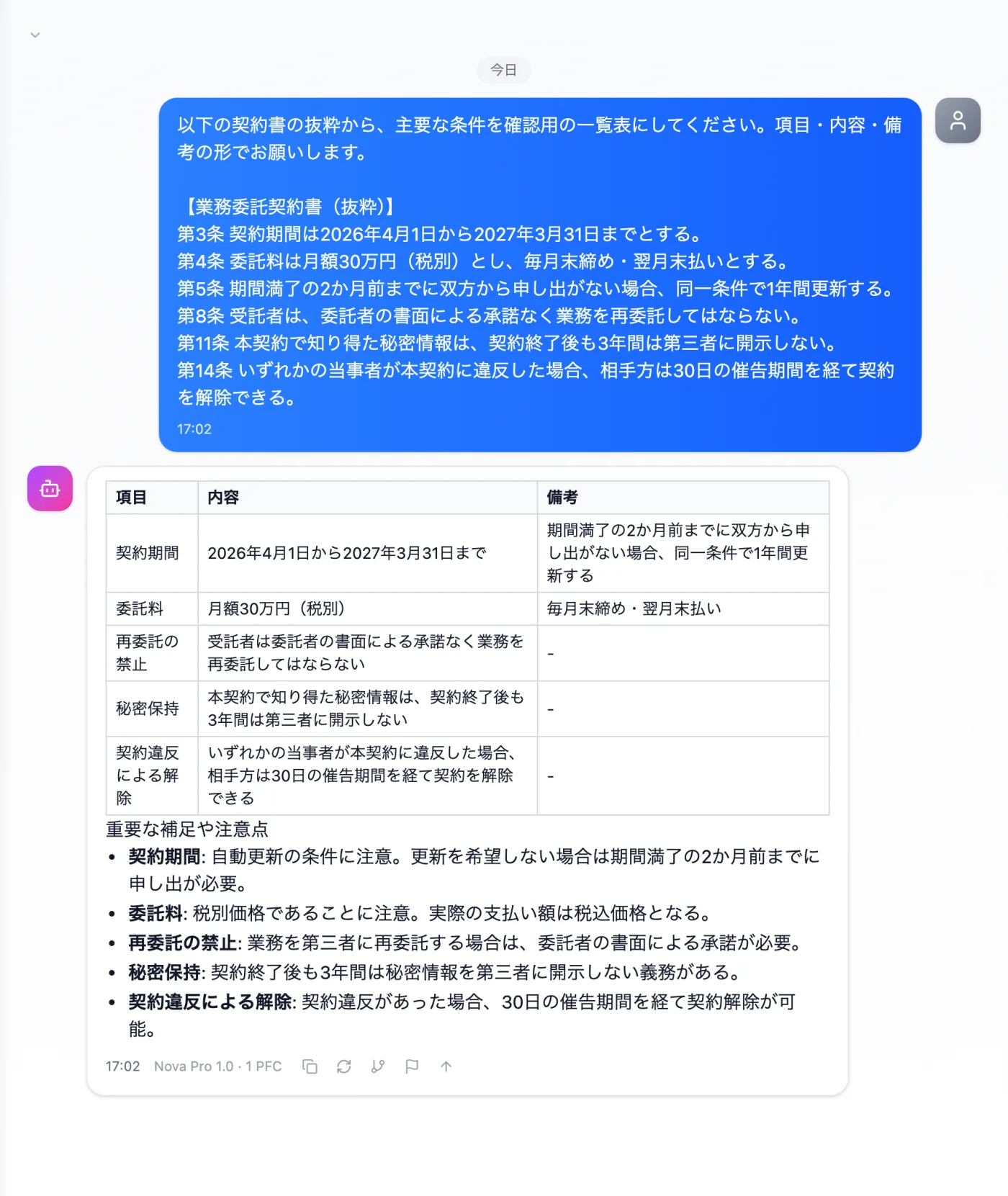
Actual screen (using the "Table format" output style) (an example of use)View larger image
Just 3 steps
Paste the clauses
Paste the clauses you want to check, with their article numbers.
Choose a style
Select "Table format" from "Presets" in the input area.
Check against the original
Compare amounts, periods and days one by one with the original contract.
How to turn contract clauses into a table
- Paste the clauses of the contract you want to check, with their article numbers. You don't need the full text; an excerpt of the articles you want to see, such as period, amount, renewal and termination, is enough.
- Specify the columns: "Please make a table of the key terms in the format item, details, notes."
- Select "Table format" from "Presets" in the input area and send.
- Compare the amounts, periods and days in the returned table one by one with the original clauses.
- Use the checked table for sharing internally or as material for a review before renewal.
Contract items worth putting in a table
- The contract period, whether it renews automatically, and the deadline for giving notice
- Fees and payment terms (closing date and payment date)
- Whether subcontracting is allowed, and the conditions that require consent
- The scope of confidentiality and how long it lasts after the contract ends
- The notice period after a breach, and the conditions for termination
- The scope of damages, and whether there is a cap
- The governing law, and the court for disputes
When you want to review contract terms
- When renewal is approaching and you want to see the terms with deadlines in one list
- When you want to compare a new client's draft contract with a previous one, item by item
- When the clauses are long and you need to explain the terms to others in your department
- When the person in charge of contract reviews changes and you want to hand over a list of the terms
- When a client asks about the contract terms and you want to find the relevant article quickly
How to ask so the terms are easy to pick out
- Write in your request what you want in the notes column (such as the deadline for renewal notice).
- If you only want the terms with deadlines (renewal, termination, payment) pulled out, say so in your request.
- When pasting clauses, keep the article numbers. That makes it easier to find them when you go back to the original to check the table.
How to use the table once it's done
- After checking them, copy the deadlines in the table to your own calendar.
- Use the article numbers in the table to ask the legal team to check.
- Before renewal, go over the table with the person in charge of the account and discuss which terms to revisit.
- When circulating it internally, add the date you checked it to the table.
Questions about making a table of terms
- Can the table have columns other than item, details and notes?
- You can ask for specific column names and an order, such as "Our response" or "Department in charge". Choose them to fit the perspective you need.
- What if there are several contracts?
- Ask for a table for each contract with the same columns. Reading them side by side shows the differences in terms.
Other uses work the same way
If you are unsure about the wording, you can also have another AI write it and compare.
Your next contract check starts with a table.
Try it in Prompt Flow Studio