Sales / Project status list
So many projects
you can't see the whole picture.
A status list in a table.
Just write one line of progress per project. A status list comes back with columns for status, issues and next action.
Try it in Prompt Flow StudioProject notes provided
Please turn the progress notes for each project below into a table of status, issues and next action.
[Project notes]
- Company D internal portal renewal: Development 70% done. Article migration is running a bit behind. Adding 1 person to migration next week
- Company E booking system: Live in production. More inquiries than expected. Add FAQs
- Company F inventory management update: Defining requirements. The client's decision-maker hasn't been set. Confirm at the 11/8 regular meeting
- Company G website update: Design proposal submitted. Waiting for the client's reply (1 week). Follow up on 11/1
- Company H data analysis support: Monthly report submitted. No particular issues. Next one on 11/25
Table returned
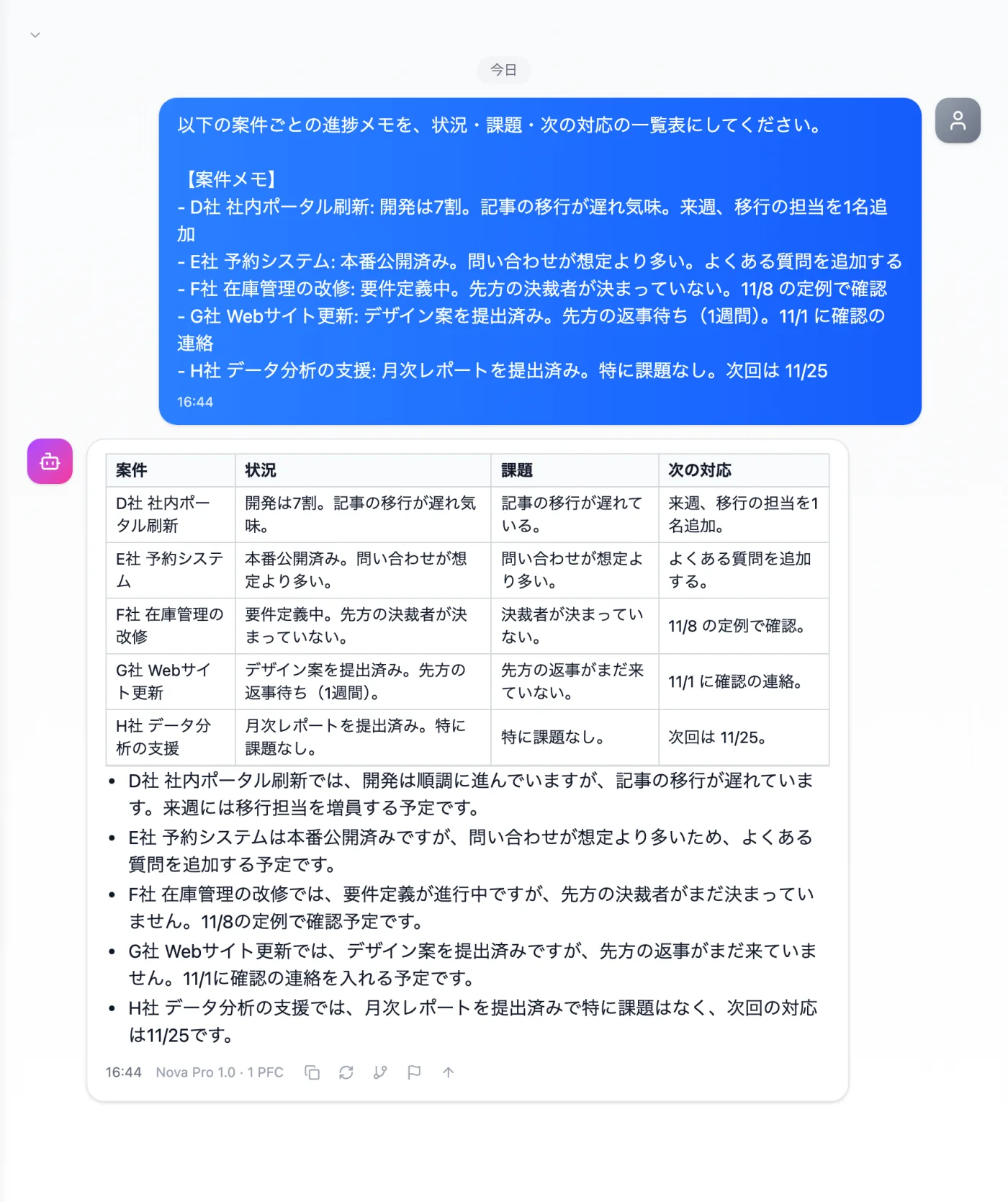
Actual screen (using the "Table format" output style) (an example of use)View larger image
Just 3 steps
Write one per project
The project name, progress, problems and next step, one line each.
Choose a style
Select "Table format" from "Presets" in the input area.
Check against your records
Confirm the table's assessments and wording match your original notes.
Other uses work the same way
If you are unsure about the wording, you can also have another AI write it and compare.
Your next regular meeting starts with a table.
Try it in Prompt Flow Studio